IGNOU Admission Status 2026 is an important update for students who have applied for admission to Indira Gandhi National Open University (IGNOU). After submitting an admission application, candidates should check whether their form has been received, their documents have been verified, and their admission has been confirmed by the university.
IGNOU offers undergraduate, postgraduate, diploma, postgraduate diploma, and certificate programmes through Open and Distance Learning (ODL) and online learning modes. Since thousands of students apply during each admission cycle, processing an application and confirming admission may take time.
Students can check their admission or registration details through the university’s official online service. If the application is incomplete, a document discrepancy is identified, or payment confirmation is delayed, candidates should follow the instructions provided through the official portal.
This article explains how to check IGNOU Admission Status 2026, the official status-check link, the meaning of different application statuses, how to resolve common problems, and where to find important admission-related services.
IGNOU Admission Status 2026: Overview
The following table provides the key information students should know before checking their admission status.
| Particular | Details |
|---|---|
| University name | Indira Gandhi National Open University |
| Common abbreviation | IGNOU |
| Admission year | 2026 |
| Admission cycles | January and July |
| Programmes offered | Undergraduate, postgraduate, diploma, postgraduate diploma and certificate programmes |
| Learning modes | Open and Distance Learning and online programmes |
| Application mode | Online for the relevant admission portals |
| Admission status | Checked through the official admission-status service |
| Information required | Enrolment number, programme code and verification details, as requested by the portal |
| Official university website | https://www.ignou.ac.in/ |
| Official admission-status link | https://isms.ignou.ac.in/changeadmdata/AdmissionStatusNew.ASP |
| Fresh admission portal | https://ignouadmission.samarth.edu.in/ |
| Online programmes portal | https://iop.ignouonline.ac.in/ |
| Re-registration portal | https://onlinerr.ignou.ac.in/ |
| Student services portal | https://ignou.samarth.edu.in/ |
Students should use the portal that matches their purpose. Fresh admission, re-registration, admission-status checking, and downloading an identity card are different services.
What Is IGNOU Admission Status?
IGNOU admission status indicates the current position of a student’s admission or registration record. After submitting an application, the university may need to process the information, verify the documents, check the eligibility requirements, and confirm the fee payment.
The admission-status service helps applicants determine whether their admission details are available in the university’s records.
Checking the status is useful because it can help students identify whether they need to provide additional information, correct a discrepancy, wait for processing, or contact the university for assistance.
Students should not assume that submitting an application automatically means admission has been confirmed. They should check the official portal and follow any instructions issued by IGNOU.
How to Check IGNOU Admission Status 2026 Online?
Students can follow these steps to check their admission status.
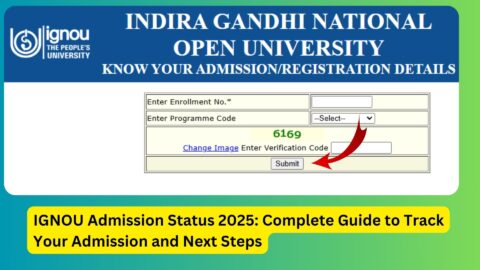
Step 1: Visit the Official IGNOU Admission-Status Portal
Open the official status-check page:
https://isms.ignou.ac.in/changeadmdata/AdmissionStatusNew.ASP
This service is intended to display admission and registration details recorded by IGNOU.
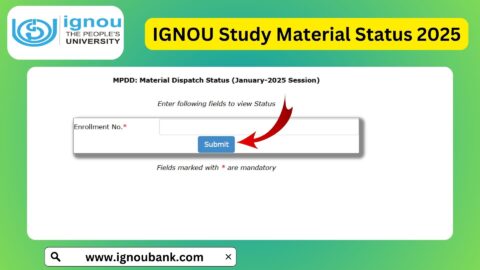
Step 2: Enter Your Enrolment Number
Enter the enrolment number requested by the portal. Check the number carefully before proceeding.
If you have only recently submitted an application and have not yet received an enrolment number, review your application acknowledgement and the instructions available on the admission portal.
Step 3: Select the Programme Code
Choose the appropriate programme code from the available options. Make sure that the selected programme corresponds to the course for which you applied.
Entering the wrong programme code may prevent the portal from displaying the expected information.
Step 4: Complete the Verification Field
Enter the verification code shown on the page, if requested. This helps the system verify that the request is being submitted by a user.
Step 5: Submit the Details
Submit the information and review the admission or registration details displayed on the screen.
The information available may include admission details, programme information, study-centre details, or other registration records maintained by the university.
Step 6: Follow Any Instructions Displayed
If the portal displays a discrepancy, pending verification, or another instruction, follow the stated procedure. Keep copies of your application acknowledgement, fee receipt, and supporting documents in case you need to contact IGNOU.
Students should use the official portal rather than entering personal details on unofficial websites.
IGNOU Admission Status 2026: Important Status Meanings
The exact wording displayed on the portal may vary. The following explanations describe common situations students may encounter while checking their admission.
1. Admission Confirmed
A confirmed admission generally indicates that the university has accepted the application and recorded the admission.
Students should check the displayed programme and registration information carefully. They should also monitor their registered email address and the official student portal for further instructions.
After confirmation, eligible students may be able to access their enrolment details and download their identity card through the appropriate student service.
2. Application Under Process
An application under process generally means that the university is still reviewing or processing the submitted information.
This may happen when an application has recently been submitted or when the university is processing a large number of applications.
Students should check the portal periodically and avoid submitting a duplicate application unless IGNOU specifically instructs them to do so.
3. Pending Verification
A pending status may indicate that one or more parts of the application still require verification. The reason may relate to documents, eligibility, payment reconciliation, or another administrative requirement.
Students should review the messages displayed in their admission account and check whether the university has requested additional information.
4. Discrepancy Found
A discrepancy means that the university has identified an issue that needs to be resolved before the application can proceed.
Possible issues include unclear documents, missing information, mismatched details, or an incomplete supporting document.
If a discrepancy link is available in the student’s account, follow the instructions to upload the corrected document or provide the requested information. IGNOU has communicated that applicants may be notified through the admission portal when discrepancies are identified.
5. Status Not Found
A status-not-found message does not necessarily mean that the application has been rejected.
Possible reasons include entering an incorrect enrolment number or programme code, a recently submitted application that has not yet appeared in the status system, or a technical issue.
Check the details entered and review the application acknowledgement. If the problem continues, contact the relevant IGNOU support service or regional centre.
6. Admission Rejected
If the portal explicitly displays a rejection or cancellation decision, read the accompanying reason carefully.
A rejection may relate to eligibility, missing or invalid documents, an unresolved discrepancy, or another condition specified by the university.
If you believe the decision is incorrect, contact the relevant admission authority through the official support channels and provide the application reference and supporting evidence. Do not assume that a rejected application can automatically be restored.
IGNOU Admission Status 2026 for January and July Sessions
IGNOU generally operates admission cycles associated with January and July sessions. However, the programmes available, application deadlines, and admission conditions can differ by session and learning mode.
January 2026 Admission Status
Students who applied for the January 2026 session should use the official admission-status service to review their recorded admission details.
If the admission is confirmed, they should check their programme information, student identity card availability, and any academic instructions issued by their regional or study centre.
Students whose applications remain unresolved should review the messages displayed in their account and contact the appropriate support service if necessary.
July 2026 Admission Status
Students who applied for the July 2026 session can also use the official admission-status portal.
The fresh-admission deadlines for July 2026 programmes have been revised during the admission cycle. Applicants should check the official IGNOU announcements for the latest applicable schedule rather than relying on an older deadline published elsewhere.
Students who have already submitted their forms should focus on checking the status of their own application, resolving any discrepancy, and confirming whether their admission has been approved.
What to Do If IGNOU Admission Status Is Not Updated?
It can be concerning when an application remains unchanged for several days. However, students should first verify their application information and follow the instructions available through the university.
Check Your Application Details
Make sure that you are using the correct enrolment number and programme code. Review your application acknowledgement to ensure that the submitted information matches the details entered on the status page.
Verify the Payment
If you paid the application fee online, check whether the transaction was successful. Save the payment receipt or transaction reference.
If the amount was debited but the application portal does not reflect the payment, contact the relevant official support service with the transaction details. Avoid paying a second time unless the university or authorised payment system instructs you to do so.
Check for Document Discrepancies
Log in to the admission account, if available, and check for any request to correct information or upload a document.
Ensure that uploaded files are readable and meet the requirements stated in the application instructions.
Allow Time for Processing
Admission processing times can vary according to the session, programme, volume of applications, and verification requirements.
If the application has been submitted successfully and no action is requested, check the portal periodically rather than repeatedly submitting the same form.
Contact the Appropriate IGNOU Office
If the status remains unresolved, contact the relevant regional centre or the official admission support service. Provide the application acknowledgement, enrolment number where available, programme details, and payment receipt if the issue concerns payment.
Use official contact information published by IGNOU and avoid sharing sensitive information with unofficial agents.
How to Download the IGNOU Student Identity Card?
Students whose admission has been confirmed may be able to download their student identity card through the official student services portal.
Follow these steps:
- Visit https://ignou.samarth.edu.in/.
- Register or log in using the required student credentials.
- Open the relevant student services section.
- Select the identity-card download option, if available.
- Download the PDF and save a copy for future reference.
The exact steps may change as IGNOU updates its student services. If the identity card is unavailable despite confirmed admission, check the admission portal and contact the relevant regional centre if necessary.
Students should not treat an unavailable identity card as automatic proof that admission has been rejected. First confirm the status recorded by the university.
Difference Between IGNOU Fresh Admission and Re-Registration
Students often confuse fresh admission with re-registration, but the two processes serve different purposes.
| Feature | Fresh admission | Re-registration |
|---|---|---|
| Purpose | Apply to join a programme | Continue an existing programme for the next semester or academic year, where applicable |
| Intended users | New applicants and eligible applicants changing or joining a programme as permitted | Existing students continuing their programme |
| Official portal | https://ignouadmission.samarth.edu.in/ | https://onlinerr.ignou.ac.in/ |
| Main requirement | Meet admission eligibility and submit the required application | Follow the programme’s continuation and re-registration requirements |
| Status checking | Use the admission-status service or application dashboard | Use the relevant re-registration or student portal |
| Important action | Confirm that the admission is approved | Confirm that the re-registration form and fee have been processed |
Students should choose the correct service to avoid confusion. A continuing student should not submit a fresh-admission form simply because they want to register for the next semester or academic year.
Important Links for IGNOU Admission Status 2026
The following table contains important official links for admission-status checking and related student services.
| Purpose | Official link |
|---|---|
| IGNOU official website | https://www.ignou.ac.in/ |
| Check admission or registration status | https://isms.ignou.ac.in/changeadmdata/AdmissionStatusNew.ASP |
| Fresh admission for ODL programmes | https://ignouadmission.samarth.edu.in/ |
| Online programmes admission portal | https://iop.ignouonline.ac.in/ |
| Re-registration portal | https://onlinerr.ignou.ac.in/ |
| Student portal and identity card services | https://ignou.samarth.edu.in/ |
| Official admission announcements | https://www.ignou.ac.in/announcements/0?nav=6 |
| Student services information | https://www.ignou.ac.in/pages/65 |
| IGNOU contact information | https://www.ignou.ac.in/pages/4 |
Always check that you are using the correct portal for the service you need. Admission status, fresh admission, re-registration, and student identity-card services may use different systems.
FAQ about IGNOU Admission Status 2026
How can I check IGNOU Admission Status 2026?
Visit the official admission-status portal at https://isms.ignou.ac.in/changeadmdata/AdmissionStatusNew.ASP. Enter the requested enrolment number, programme code, and verification details to view the available information.
What information is required to check IGNOU admission status?
The official status page requests an enrolment number, programme code, and verification code. Follow the exact instructions shown on the page.
What does confirmed admission mean in IGNOU?
A confirmed status generally indicates that the university has accepted and recorded the admission. Students should check their programme information and monitor official student services for further instructions.
Why is my IGNOU admission status still pending?
The application may still be under review, documents may require verification, or payment reconciliation may be incomplete. Check your admission account for instructions and contact the university if the issue persists.
What should I do if my IGNOU admission status shows a discrepancy?
Open your admission account and check whether a discrepancy link or correction instruction is available. Upload the requested information or corrected documents according to the university’s instructions.
What does status not found mean?
It may indicate incorrect details, a recently submitted application that has not yet appeared in the status system, or a technical issue. Recheck your enrolment number and programme code before contacting the university.
How long does IGNOU take to confirm admission?
Processing time varies by programme, admission session, application volume, and document verification requirements. IGNOU does not necessarily confirm every application within the same period, so students should follow official updates rather than rely on a fixed number of days.
Can I check IGNOU admission status without an enrolment number?
The official status page requests an enrolment number. If you have not received one, check your application acknowledgement and admission account for registration details or instructions.
How can I download my IGNOU ID card after admission confirmation?
Visit https://ignou.samarth.edu.in/, log in using the required credentials, and open the identity-card service if it is available for your account.
What is the difference between admission and re-registration?
Fresh admission is used to apply to join a programme. Re-registration is generally used by existing students to continue their programme for the next semester or academic year, where applicable.
Where can I check the latest IGNOU admission dates?
Visit the official IGNOU website at https://www.ignou.ac.in/ and review the latest admission announcements. Deadlines can vary by session, programme, and learning mode.
Whom should I contact if my admission status is incorrect?
Contact the relevant IGNOU regional centre or the official admission support service. Provide your application acknowledgement and other relevant details so the university can review the issue.
Conclusion
IGNOU Admission Status 2026 allows students to check the progress and recorded details of their admission applications. By using the official status-check portal, applicants can review their registration information, identify possible discrepancies, and follow the instructions required to resolve application issues.
Students should carefully distinguish between fresh admission and re-registration and use the correct official portal for each service. If the status remains pending, is not found, or displays a discrepancy, check the submitted details, review the admission account, and contact the appropriate IGNOU office when necessary.
For accurate information, always use the official IGNOU website and its admission-status service. Keep your application acknowledgement, payment receipt, and relevant documents safe, and monitor official announcements for updates. These steps can help students manage the admission process more confidently and avoid unnecessary delays.